Home React → Native The App Features Stack Resources Live Sessions Instructor Join Now
Live Course · Sessions with Kareem

React Native
for React
Developers

You already know React — that's your superpower. In this live course, Kareem walks you through building a full e-commerce mobile app with React Native from scratch, session by session.

Learn more
Lifetime accessLifetime Source code includedSource code Live sessionsLive
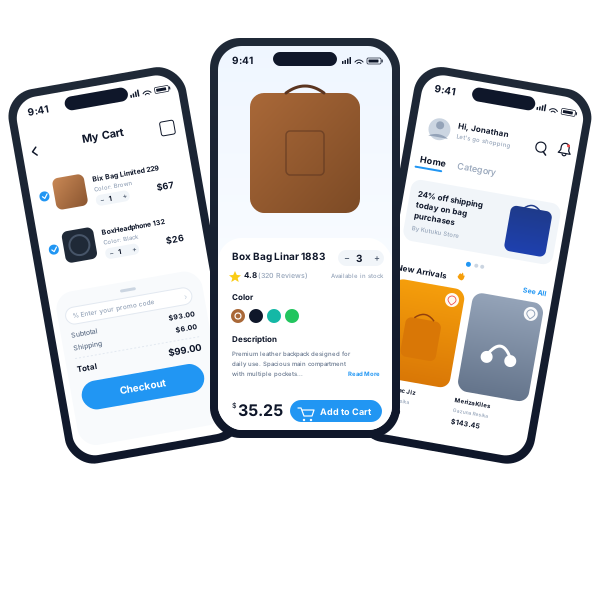
9:41
My Cart
Bix Bag Limited 229
Color: Brown
1+$67.00
BoxHeadphone 132
Color: Black
1+$26.00
% Enter your promo code
Subtotal$93.00
Shipping$6.00
Total$99.00
Checkout
9:41
Box Bag Linar 1883
3+
4.8(320 Reviews) Available in stock
Premium leather backpack designed for daily use. Spacious main compartment with multiple pockets... Read More
$35.25
Add to Cart
9:41
Hi, Jonathan Let's go shopping
Home Category
24% off shipping today on bag purchases
By Kutuku Store
New Arrivals 🔥 See All
The Mirac Jiz
Lisa Robber
$195.00
Meriza Kiles
Gazuna Resika
$143.45
Home
Order
Favorite
Profile

Your React skills? They work here too.

Same hooks. Same components. Same patterns. The only thing that changes is a handful of platform primitives — View, Text, Image instead of div, p, img.

👀 Look familiar? — it should. Side by side, the same component for web and mobile. — it should. Tap below to see the React Native version.
⚛ React (Web)
import { useState, useEffect } from 'react'
import { useSelector } from 'react-redux'
import { useQuery } from '@tanstack/react-query'
import './ProductCard.css'

function ProductCard() {
  const [added, setAdded] = useState(false)
  useEffect(() => { fetchProduct() }, [])

  return (
    <div className="card">
      <img src={img} />
      <p className="name">{name}</p>
      <button onClick={add}>
        Add to Cart
      </button>
    </div>
  )
}
📱 React Native
import { useState, useEffect } from 'react'
import { useSelector } from 'react-redux'
import { useQuery } from '@tanstack/react-query'
import { StyleSheet } from 'react-native'

function ProductCard() {
  const [added, setAdded] = useState(false)
  useEffect(() => { fetchProduct() }, [])

  return (
    <View style={s.card}>
      <Image source={img} />
      <Text style={s.name}>{name}</Text>
      <Pressable onPress={add}>
        Add to Cart
      </Pressable>
    </View>
  )
}
Same logic. Same hooks. Same data layer. Only the primitives change.

A full e-commerce app — not a toy project.

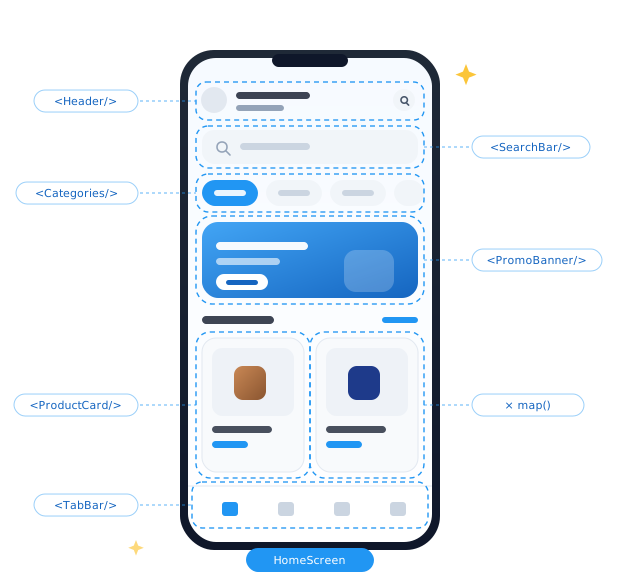
Production-quality screens covering the entire shopping experience: onboarding, auth, product discovery, cart, checkout, payments, order tracking, and settings. By the end, you've shipped a real app you can put on your portfolio.

💡 Hover any screen to see what you'll build💡 Tap any screen to see what you'll build

👋
Onboarding
🔐
Auth & OTP
🏠
Home Feed
🔍
Discover & Search
🛍️
Product Detail
❤️
Favorites & Wishlist
🛒
Cart & Checkout
📍
Address & Location
📦
Order Tracking
👤
Profile & Settings
🔔
Notifications
iOS + Android RTL + LTR

Real-world features. Not just a basic app.

Beyond the core e-commerce flow, you'll implement the advanced features that separate amateur apps from professional ones.

🌍

Multi-Language App

Full i18n with RTL support — Arabic, English, and any language you need.

🎨

Multi-Theme Support

Light, dark, and custom themes that persist across sessions.

🔒

Guarded Routing

Auth-guarded screens with Expo Router — handle token expiry and roles.

⚙️

Multi-Environment Config

Dev, staging, and production environments with proper .env config.

🔔

Push Notifications

Real push notifications — foreground, background, and tap events handled.

🚀

Publish for Testing

Share with testers via TestFlight, Firebase, or internal distribution.

📱

iOS & Android Support

One codebase, two platforms — fully native iOS and Android support.

🛡️

Security & Pen-Test Ready

SSL pinning, secure storage, and hardened APIs — pen-test ready.

📐

Pixel-Perfect on Every Screen

A UI that looks identical on every device — from iPhone SE to iPad.

The professional mobile stack.

Every tool used in this course is production-grade and used by mobile teams at top companies today.

RN
React Native
Core framework
Ex
Expo CNG
Build system
TS
TypeScript
Type safety
JS
JavaScript
Language
RT
Redux Toolkit
State management
RQ
React Query
Server state
Real E-com API
Live backend
🛒
Real e-commerce backend

You'll integrate with a live production API — real products, real orders, real payments. Not mock data.

🤖
AI for troubleshooting

Learn to use AI tools like ChatGPT, Claude, and Copilot to debug faster, understand error messages, and ship production features in a fraction of the time.

Get the course materials.

Download the curriculum, browse the design, or explore the live preview.

Modern Expo. Not the Expo you remember.

You won't need to eject. You won't hit a ceiling. The architecture changed — and most developers haven't caught up yet.

"I'll have to eject for native code"
Config plugins handle native changes — no ejecting required, ever.
"Expo limits you to its built-in SDK"
Expo Modules API lets you write any Kotlin or Swift module yourself.
"It's not ready for serious production apps"
2,200+ apps ship with Expo today, including the ones below ↓

Learn live, with your instructor in the room.

This isn't a pre-recorded course you forget after day three. Kareem runs each session live so you can ask questions, debug together, and learn like a real engineer on a real team.

🎙️
Live sessions with KareemAttend each module live — ask questions in real-time as you build.
💬
Community & supportJoin the group, share progress, get unstuck with peers.
♾️
Lifetime recordingsMiss a session? Every session is recorded and yours forever.
🛠️
Build as you watchEvery session ends with a working screen you can run on your phone.
01

Tune in live

Each module runs at a scheduled time. You join, Kareem starts the session, and you build along — no playback button.

Scheduled · Live
02

Code along, in real time

Kareem builds the screen on his side, you build it on yours. Every line of code, decision, and refactor happens with you watching.

Hands-on · Together
03

Hit a bug? Ask live.

Stuck on something? Drop it in the chat. Kareem stops, debugs it on screen, and explains the fix — you and the cohort all learn from it.

Q&A · Debugging
04

Walk away with working code

Every session ends with a screen running on your phone. Plus the recording, source code, and a clear next step for the next session.

Outcome · Shipped
Kareem Nour, instructor
Kareem Nour
Mobile Team Lead · Kimz Codes

Kareem has 15 years of experience building and shipping web and mobile apps at scale. He currently leads the mobile team at one of Egypt's top tech companies — bringing real production engineering thinking to every session, not just tutorial-level knowledge.

As the creator of Kimz Codes, he has built a community of Arab developers who learn mobile and frontend development through practical, no-nonsense content.

15+
years exp
apps shipped
Live
sessions
Starts June 12 · Limited cohort

Reserve your seat.

Limited seats in the first cohort. Join the waitlist now and save 30%.

Live sessions Real production project iOS + Android Completion certificate
Join the waitlist